So far seems to be hit or miss for this rom.
I've tried installing two flavors.
The Stock theme seemed pretty good.
Then I tried wiping (twice) and installing the droidx theme.
Seems to be duplicating my songs list in the music player.
Tried diff music player (mixzing), and it still showed duplicates.
Saw somewhere on this forum to try copying the music to my PC, deleting the music folder and re-copying them over and let the music repopulate it's database. That worked, until I rebooted.
Any ideas??
Sounds to me like there could be a corrupted file on the sdcard itself somewhere. I had issues awhile back like you described. I finally got so irritated I copied the entire SDCARD to my comp and then reformatted it via the phone to then manually moved things back little by little to try figuring out the issue. After getting everyhtig moved back over the course of 2 days never had the issue. So my only thought was it must have been the sdcard itself giving me grief for whatever reason.
Same here. My 2.1 roms worked fine.So far seems to be hit or miss for this rom.
I've tried installing two flavors.
The Stock theme seemed pretty good.
Then I tried wiping (twice) and installing the droidx theme.
Seems to be duplicating my songs list in the music player.
Tried diff music player (mixzing), and it still showed duplicates.
Saw somewhere on this forum to try copying the music to my PC, deleting the music folder and re-copying them over and let the music repopulate it's database. That worked, until I rebooted.
Any ideas??
Sounds to me like there could be a corrupted file on the sdcard itself somewhere. I had issues awhile back like you described. I finally got so irritated I copied the entire SDCARD to my comp and then reformatted it via the phone to then manually moved things back little by little to try figuring out the issue. After getting everyhtig moved back over the course of 2 days never had the issue. So my only thought was it must have been the sdcard itself giving me grief for whatever reason.
I had the same problem as well. I found that from constantly changing Roms via Clockwork or downloading the zip files or whatever, my SD card was corrupted. To the point that i could no longer update or load new and existing apps on my phone. I copied all of my files from my SD card to my computer, re-formatted the Sd card in Safe Mode on my phone and deleted a lot of BS from the Card and now it is running fine and this was 3 days ago. This only happened with Froyo Roms because when I was experiencing the problem, I went back to ESE81 2.1 Roms and did not have any problem. I also thought it could have been related to apps2sd feature.
WOW!!! This ROM is killer. I threw the DROID X themed ROM on yesterday and have been running it today and it is freaking AWESOME! I am stoked to have 7 screens back!
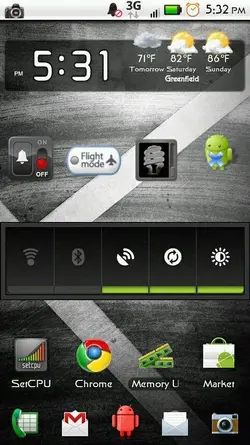
+1 on that requestAny preview pics of the Droid X theme?
Any preview pics of the Droid X theme?
sweet even wifi works and it hasnt worked on any 2.2 till now![]()
anyone know how i can fix not being able to install apps from the market? it downloads but when it tries to install it always says install unsuccessful...help... ;(
Any preview pics of the Droid X theme?
anyone know how i can fix not being able to install apps from the market? it downloads but when it tries to install it always says install unsuccessful...help... ;(
This has been a common...no...almost a *given* issue since the first froyo leak. It comes up in every ROM forum at some point. A search of the forum would give you about 500 repeats of the same answer. Search is your friend.
Not one "market fix" for any ROM has ever solved the problem permanently for me. Here's the ONLY thing that works, regardless of what ROM I am running:
CLEAR. CACHE. AND. DATA. IN. THE. MARKET. APP. Settings > Manage Applications > Market, then force close it if it's running, and then? CLEAR. CACHE. AND. DATA. IN. THE. MARKET. APP.
My guess is that since Froyo is not officially released, the Market has problems interacting with it. Different ROM developers have tried workarounds but not one of them has ever solved the problem for me. However...it always works after I...you guessed it...CLEAR. CACHE. AND. DATA. IN. THE. MARKET. APP.![]()