What's new
DroidForums.net | Android Forum & News

This is a sample guest message. Register a free account today to become a member! Once signed in, you'll be able to participate on this site by adding your own topics and posts, as well as connect with other members through your own private inbox!

no gps with jelly bean.

nhepler90

Member
I finally went from the 215 leak to 211, then to jelly bean official update and love it so far! Only one issue I have found and couldn't seem to find a thread about it, I have lost my GPS ability. Anyone else have this issue or know a fix?

Much thanks.
 
I finally went from the 215 leak to 211, then to jelly bean official update and love it so far! Only one issue I have found and couldn't seem to find a thread about it, I have lost my GPS ability. Anyone else have this issue or know a fix?

Much thanks.

Try GPS Doctor app.
 
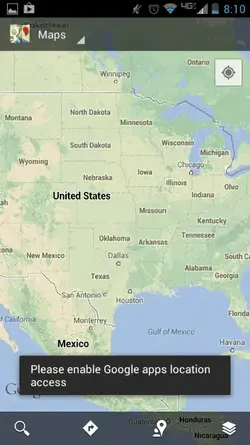
I downloaded GPS status free and it is getting a lock on my GPS, but whenever I use Google maps and hit the my location icon, it says to enable Google apps location (turn GPS on). I cleared the cache and force stopped the app, I also uninstalled the updates and re installed them to no avail.
 
I downloaded GPS status free and it is getting a lock on my GPS, but whenever I use Google maps and hit the my location icon, it says to enable Google apps location (turn GPS on). I cleared the cache and force stopped the app, I also uninstalled the updates and re installed them to no avail.

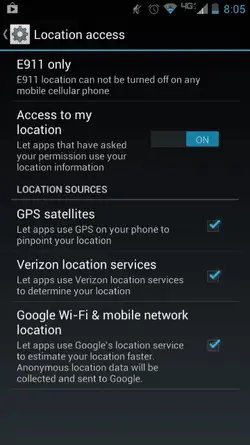
Make sure you have all the boxes checked including the Google WiFi and mobile network location. I have all boxes checked and mine has worked all the time. If that doesn't work then I'm sure one of the other smarter people will give you some advise. Good luck.
 
All is checked. I downloaded a free GPS app to see if it would lock on and it does. (Pretty quick at it too) so I'm guessing it has to do with Google maps. Would still like to know if anyone else has the same issue or knows of a fix.
 

Attachments

  • ForumRunner_20130418_080752.webp
    ForumRunner_20130418_080752.webp
    20.5 KB · Views: 413
  • ForumRunner_20130418_081049.webp
    ForumRunner_20130418_081049.webp
    25.7 KB · Views: 378
  • ForumRunner_20130418_081123.webp
    ForumRunner_20130418_081123.webp
    12.3 KB · Views: 373
I had the same problem with the same message on my wife's phone. I checked and unchecked the boxes, turned off and turned on locations settings, re-booted the phone a couple of times and finally something worked to get it going again. I'm not sure what the combination was, but it did start working correctly. I know, I should have done one thing at a time to see what worked, but I was too impatient. My Maxx had no problems with maps after the update.
 
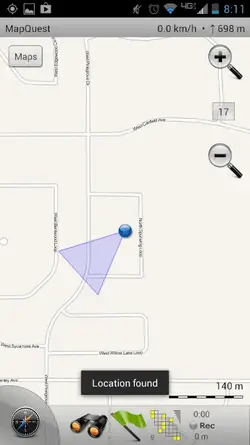
I downloaded map quest because GPS seems to work with other apps and not Google maps, I need it because I am terrible with directions. I will try rebooting and such multiple times and see if anything changes.
 
I downloaded map quest because GPS seems to work with other apps and not Google maps, I need it because I am terrible with directions. I will try rebooting and such multiple times and see if anything changes.

If not try an FDR(factory data reset).
 
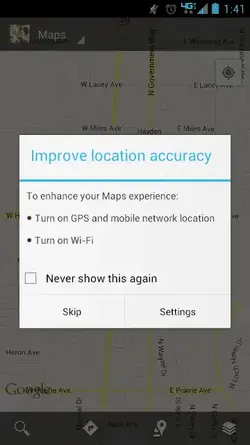
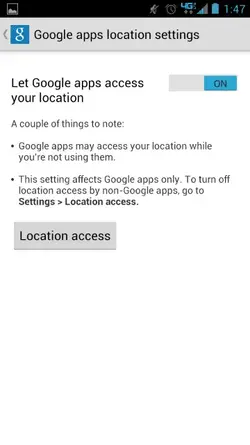
Found out the problem and Google maps GPS is working now. Turns out there is two different spots to turn location access on. The one in locations under system settings and the settings window that pops up when you first enter maps. (See picture) it came up with a totally different screen that I can't find that had a toggle for Google apps to use your location/GPS. Thank you for the ideas and help.
 

Attachments

  • ForumRunner_20130418_134345.webp
    ForumRunner_20130418_134345.webp
    13.7 KB · Views: 636
Ok it is in google>location settings under the accounts in system settings.
 

Attachments

  • ForumRunner_20130418_134746.webp
    ForumRunner_20130418_134746.webp
    12.9 KB · Views: 372
I think that's what fixed it on my wifes phone too. The box didn't pop up until I rebooted and re-opened maps multiple times and then it finally showed up. Gald your's works now.
 
I'm having the same problem, and so far none of the things tried about have worked for me. Anyone have a solid fix. GPS doctor did nothing.
 
I'm having the same problem. I've tried all of these things and nothing has worked. Mine works sporadically but can't seem to get a stable fix on the satellites. If it's not reliable as a navigation tool it's totally useless. I'm hopeless with maps and really need to know it won't drop the GPS signal. Does anyone know if Google Maps recognises this as an issue?
 
hi all

Found out the problem and Google maps GPS is working now. Turns out there is two different spots to turn location access on. The one in locations under system settings and the settings window that pops up when you first enter maps. (See picture) it came up with a totally different screen that I can't find that had a toggle for Google apps to use your location/GPS. Thank you for the ideas and help.

go into settings location and tick all 3 boxes this will let you use gps it worked for me ;-)
 
Back
Top