What's new
DroidForums.net | Android Forum & News

This is a sample guest message. Register a free account today to become a member! Once signed in, you'll be able to participate on this site by adding your own topics and posts, as well as connect with other members through your own private inbox!

Droid Desktop Screenshots #2

entcee

Member
Droid Desktop Screenshots (non-rooted)

I have enjoyed looking at all the different desktops people have but but most of the users have rooted their Droid and can do a lot more than the few of us on the forum (yes, we are in the minority here) who have not.

I though I would start a new thread to show screenshots of Droids that have not been rooted. They won't look quite as nice but it will show what customizations can be done without rooting.

When posting pics, please provide what widgets / aps you are running to avoid the "what battery widget is that?" questions.

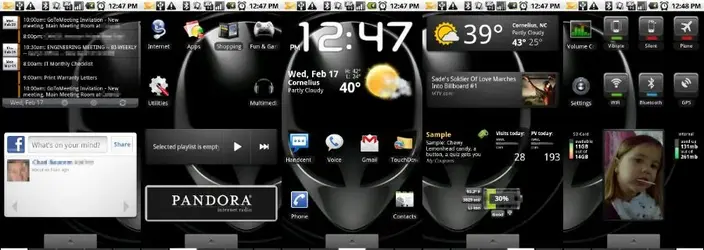
Here is mine:
attachment.php


Home Replacement:
  • 5 (or more) screen home replacement: Launcher+ beta (free)
Screen 1:
  • Agenda Widget (free)
Screen 2:
  • Folders via Apps Organizer (free)
Screen 3:
  • Beautiful Widgets (NakedDroid skin) ($0.99)
Screen 4:
  • 2.1 Weather Widget (free)
  • 2.1 News Widget (free)
  • My Coupons Widget (free)
  • Analitics Widget (free)
  • BatteryLife Widget (free)
Screen 5
  • Volume Control (free)
  • Beatiful Widgets
  • Internal Memory Widget (free)
  • SD Card Memory Widget (free)
 

Attachments

  • Screen1.webp
    Screen1.webp
    42 KB · Views: 1,353
Thats a LOT of stuff in your notification bar. Care to share what they all are?
From left to right:

Touchdown (Exchange) email notification
USB connected
USB diag mode (to take screenshots)
Bluetooth
Vibrate mode
3G connection
Cell signal strength
Battery level
Alarm (wish I could get rid of this one without turning my alarms off)
Time
 
I was actually thinking of starting a thread like this. Perhaps you should rename the topic to something like "Droid Desktop Screenshots (Non Rooted)"
 
Well as mention in the "other" screen shots thread. If your posting pics it would be best to....

Provide descriptions of the widgets and such on the screens to answer the inevitable "What battery widget is that on screen two?" questions.

Thank you!
 
Well as mention in the "other" screen shots thread. If your posting pics it would be best to....

Provide descriptions of the widgets and such on the screens to answer the inevitable "What battery widget is that on screen two?" questions.

Thank you!

+1 on this. I love the other thread but that extra bit of info would make this one much more useful.
 
Well as mention in the "other" screen shots thread. If your posting pics it would be best to....

Provide descriptions of the widgets and such on the screens to answer the inevitable "What battery widget is that on screen two?" questions.

Thank you!

If you're unrooted, how do you have 5 screens?

Well as mention in the "other" screen shots thread. If your posting pics it would be best to....

I updated the original post :)
Provide descriptions of the widgets and such on the screens to answer the inevitable "What battery widget is that on screen two?" questions.

Thank you!

+1 on this. I love the other thread but that extra bit of info would make this one much more useful.

I updated the original post to provide the additional info.
 
Nice idea for a thread. People should not feel like they have to root their phone to make it look/work nicely.

Kudos to OP for making this thread.

Of course I am rooted, so I cannot post my screenshots :D
 
Back
Top