What's new
DroidForums.net | Android Forum & News

This is a sample guest message. Register a free account today to become a member! Once signed in, you'll be able to participate on this site by adding your own topics and posts, as well as connect with other members through your own private inbox!

How do I get photos for contacts from Facebook...

formerfatboys

New Member
...without having the Droid add every single one of my 3,000 Facebook contacts to my contacts list. These are not my "contacts".

I'm coming from a Blackberry where by installing the Facebook app...accounts linked, but the Blackberry did not automatically add 3,000 contacts to my carefully pruned contact list.

Same with Twitter. I added that and another 500 contacts came in. Is there any way to add those services without adding to my contacts list?
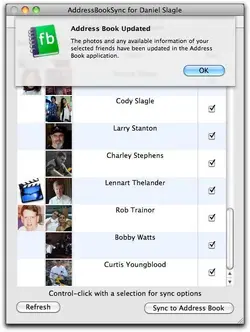
 
...without having the Droid add every single one of my 3,000 Facebook contacts to my contacts list. These are not my "contacts".

I'm coming from a Blackberry where by installing the Facebook app...accounts linked, but the Blackberry did not automatically add 3,000 contacts to my carefully pruned contact list.

Same with Twitter. I added that and another 500 contacts came in. Is there any way to add those services without adding to my contacts list?

I don't use facebook but I am synced to Twitter. I notice I don't see any of my twitter contacts on m Droid, but I believe that's because I have it set to only allow contacts with phone numbers to appear.

I'm sure the X has this someplace but I don't know where it is. Search around in your settings and see if you can find it, it would be in the contact settings. That should help.
 
open facebook app, select menu, select settings select sync with existing contacts only

As far as I can tell that option is nowhere to be found on the settings of the Facebook app.

I don't think that's the problem. I added Facebook and Twitter to the Motorola "Social Networking" app and that imported every contact ever. If I remove Facebook and Twitter the contacts disappear and I'm left with my original list, but I'd still like to have images update with Facebook.

I also like having the Moto thing because as far as I can tell it's the only Android app that lets you post to Twitter and Facebook simultaneously.
 
i believe blur changed things from the original droid. what used to be "accounts and sync" is now just accounts, and the sync options are not there anymore. I still haven't figured out where they went to
 
This is one of my biggest gripes with my X actually, I don't want ALL of my Facebook contacts showing up, I want it to sync the Facebook data only with existing contacts, the option existed on my Droid, but they removed it on the X, I even tried downloading the actual Android Facebook app (vs moto's preinstalled) and the option was missing there too
 
attachment.php


Worked for me. Thanks!

Macbok Pro running Snow Leopard
 

Attachments

  • AddressBookSyncScreenSnapz001.webp
    AddressBookSyncScreenSnapz001.webp
    29.3 KB · Views: 6,899
Does it have a favorites tab like Droid 1? If so, you can put any contacts you access frequently in there. And you have all FB and Twitter to access updates in "All Contacts". This is how I used it in my Droid and worked fine. I'm with you. Don't want to flick flick flick through thousands of contacts just to call my mom. Sometimes it takes a while for the pictures to show up. But they will eventually.
 
Ok, I Removed the account and Re-did it and made it my picture source.

Now my contacts list has all my facebook friends and phone number. Now obviously some names i have are "nicknames" for lack of better terms, or since I'm a DJ i have a lot of numbers just under their DJ Name.

is there anyway to take the phone contact and like link it together with there Facebook page? so i don't have two contacts for them...

Thanks.

Also---The pictures aren't showing up, how long does it take for it to load all the pics?

-Magic
 
Back
Top