What's new
DroidForums.net | Android Forum & News

This is a sample guest message. Register a free account today to become a member! Once signed in, you'll be able to participate on this site by adding your own topics and posts, as well as connect with other members through your own private inbox!

Need help...again....

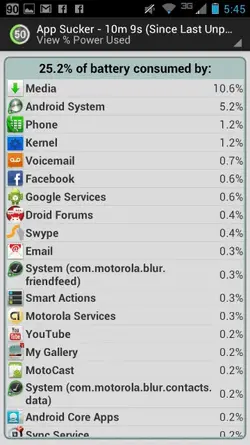
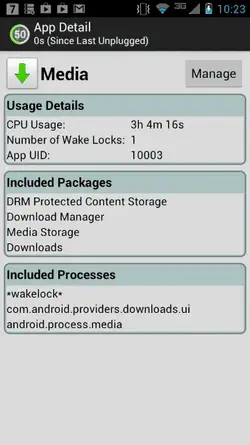
So I originally had posted back in October for help since I was switched from the Thundrbolt to the Razr Maxx. I was having a major issue with battery drain and was told about an app to help me find the app that was eating all of my battery. I found out that it was some form of media that was running in the back ground. No matter how many times I would stop it from running it would start back up and my battery would be DEAD by noon after taking off of the charger at 7 am. I got so frustrated with it that I did the unthinkable and went to Apple. I am tired of spending money on things I get for free with Android. However the battery issue still is an issue. I am not sure if this media is a update or what but I cannot deal with a battery that dies in 5 hours. Any help would be awesome.
 
So I originally had posted back in October for help since I was switched from the Thundrbolt to the Razr Maxx. I was having a major issue with battery drain and was told about an app to help me find the app that was eating all of my battery. I found out that it was some form of media that was running in the back ground. No matter how many times I would stop it from running it would start back up and my battery would be DEAD by noon after taking off of the charger at 7 am. I got so frustrated with it that I did the unthinkable and went to Apple. I am tired of spending money on things I get for free with Android. However the battery issue still is an issue. I am not sure if this media is a update or what but I cannot deal with a battery that dies in 5 hours. Any help would be awesome.

Sunshine... just to clarify, are talking about the RAZR or your iPhone? I'm not sure which one you're talking about.

Sent from my Nexus 7 using Tapatalk 2
 
I apologize I am talking about needing help with the Maxx and the battery issues and media running in the background

When you say media that could be a number of things. Do you have any app installed on your phone that sync photos, music, news or weather. Facebook, motocast, Pandora and similar apps can run in the background causing a significant drain on battery.

Sent from my Nexus 7 using Tapatalk 2
 
Are you running 4G in an area that is low on 4G service? If so, that is also a drain on your battery. There is an App called LTE on/off that can help.
 
When you say media that could be a number of things. Do you have any app installed on your phone that sync photos, music, news or weather. Facebook, motocast, Pandora and similar apps can run in the background causing a significant drain on battery.

Sent from my Nexus 7 using Tapatalk 2

Yes... JP is right! My brother in law had motocast trying to look for a wifi spot to sync his phone to when he was out and about.. His settings were to update every hour or so...Same thing could happen with Facebook.. Change those settings if you have to. I am on 4G all the time since I have unlimited data but when I was on ICS my phone would easily last all day.
 
I do live In a fringe area but this was happening even right next to a tower. As far as an app to sync stuff I personally never set anything up. As for the jb update I go into system updates and it says its up to date but still says 4.0.4
 
I do live In a fringe area but this was happening even right next to a tower. As far as an app to sync stuff I personally never set anything up. As for the jb update I go into system updates and it says its up to date but still says 4.0.4
If you have 4.0.4 then you are running the latest official system software, Ice Cream Sandwich. Jelly Bean has not been officially released as of yet, maybe by the end of March. There are quite a few users who have installed a leaked version of Jelly Bean, but it is not official. You can install it if you want, but at this point I think you should figure out what causing your power drain before installing an unofficial leak. If troubleshooting fails to solve the problem then consider rooting your phone and freezing some known battery hogs or try the unofficial leaked Jelly Bean. Your decision.

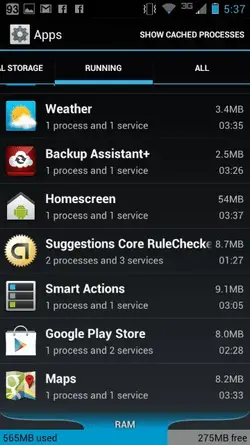
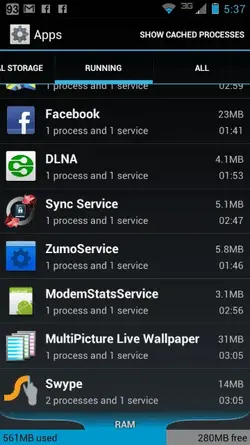
With some pre-installed apps you don't have to set up anything, they start on their own and run without you really recognizing it. There could also be an app that "syncs media" that you have downloaded and installed causing your problem. It's really hard to say which app or setting is causing your problem without being able to identify what's running on your phone. Go to settings>apps>running and tell us what is reported as running. Also tell what apps you have downloaded and installed from the Play Store or Amazon etc. I've had problems with Motocast in the past. If you have ever started Motocast and played around with it, or Facebook, I'd check those two first. They are notorious for being out of control and the user not realizing it.
 
I will take a couple of screen shots to see what is running....also a side note I am running on wifi and trying to fix the issues before I reactivate the device.
 
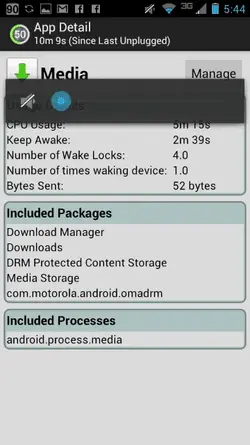
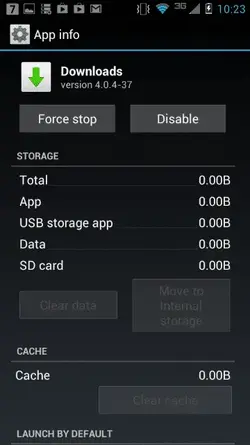
Here are the screen shots. The first is what the media is showing.
 

Attachments

  • ForumRunner_20130119_174104.webp
    ForumRunner_20130119_174104.webp
    20.6 KB · Views: 252
  • ForumRunner_20130119_174138.webp
    ForumRunner_20130119_174138.webp
    24.3 KB · Views: 244
  • ForumRunner_20130119_174145.webp
    ForumRunner_20130119_174145.webp
    23.6 KB · Views: 229
  • ForumRunner_20130119_174155.webp
    ForumRunner_20130119_174155.webp
    23.3 KB · Views: 231
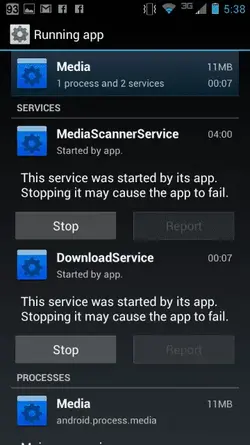
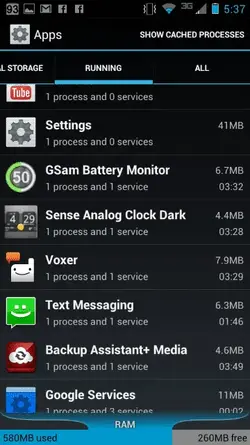
And here is a couple more
 

Attachments

  • ForumRunner_20130119_174836.webp
    ForumRunner_20130119_174836.webp
    23.9 KB · Views: 250
  • ForumRunner_20130119_174847.webp
    ForumRunner_20130119_174847.webp
    18.3 KB · Views: 222
You have a lot of "stuff" running. I guess the question is "do you really use/need" all of them. I understand now why media is such large consumer of your battery. If you have Facebook, You Tube, and all those other widgets running your going to have less than average battery life. Many off the pre-installed apps can be disabled by un installing their updates and then selecting disable. Some can be un installed. You need to figure out what you want... everything running and syncing or better battery life. It's this simple... The more you have running, downloading and syncing the shorter your battery will last. Also check the settings of what you do have running. The more often it syncs the shorter your battery will last.

Sent from my Nexus 7 using Tapatalk 2
 
There is a known problem with "Media" where it goes rogue and sucks down an inordinate amount of power, draining batteries in a matter of hours as the OP has described. Some (like me), are able to get it back under control by stopping the Media service in Apps Manage, and then clearing the Cache/Data for the app, and finally then rebooting.

Others have had the app/service continue for a couple days, and then suddenly start acting normally again. As of yet, nobody that I know of has been able to identify what is causing it or what works every time to fix it.

This may happen once in a great while, or never depending on who you talk to. I've had it hit my phone twice since I've originally activated it over a year ago. In both situations, the steps mentioned above eventually worked, but in one of the two times it took several repeats of clearing the cache and stopping the service before it worked.

Sent from my A210 using Tapatalk 2
 
Ok so i did an fdr and still media is running here is a screen shot of the media it says is running
 

Attachments

  • ForumRunner_20130122_222657.webp
    ForumRunner_20130122_222657.webp
    13.1 KB · Views: 178
  • ForumRunner_20130122_222706.webp
    ForumRunner_20130122_222706.webp
    16.9 KB · Views: 189
Back
Top