This is a sample guest message. Register a free account today to become a member! Once signed in, you'll be able to participate on this site by adding your own topics and posts, as well as connect with other members through your own private inbox!
I am sure there used to be a way to move a message from the trash folder back to the inbox folder (in a non-Gmail account). After ICS, I can't find any way to do that. Did they really eliminate that functionality?
I'll be watching this thread. I could have sworn I had done this previously (GB perhaps). Using the stock mail app on RAZR, I placed a couple e-mails in trash to try, and for the life of me I, I can't find a way either.
It really isn't a problem with me because I use my phone e-mail as an "info only" account and use outlook 2010 on my laptop to manage my e-mail. It is just unbelievable that this simple feature is not included. Hope I am overlooking something simple!:biggrin:
Oh yes, I see now "a non-Gmail account." I totally blew by that this morning - thanks for pointing that out. I'm totally in Gmail too so I don't know about the other apps.
Ephlat,
Do you, know how to view your folders?
Click inbox at top of screen.....
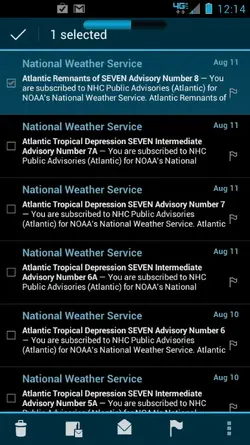
In my exchange account If I go into my trash, check the message, at the bottom of the screen second from left is an icon that looks like it has a small envelope in the right corner.
Tap that.
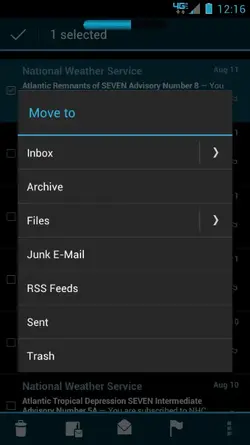
Then choose the folder to move to.
Hope this helps... Let me know.
Ephlat,
Do you, know how to view your folders?
Click inbox at top of screen.....
In my exchange account If I go into my trash, check the message, at the bottom of the screen second from left is an icon that looks like it has a small envelope in the right corner.
Tap that.
Then choose the folder to move to.
Hope this helps... Let me know.
On the stock E-mail app, after selecting an e-mail in trash, the second icon from left is a large envelope. Tapping it toggles the selected e-mail from read to un-read. Tap again, un-read to read. I truly don't believe move is an option, hope I am wrong.
Mine is a large box with a small envelope bottom right corner. The third is the big envelope for me.
I am using the email program with the @ sign in the envelope on an exchange account. I can move email as described above....
Mine is a large box with a small envelope bottom right corner. The third is the big envelope for me.
I am using the email program with the @ sign in the envelope on an exchange account. I can move email as described above....
Thanks for the input. Must be the stock APP. My screen looks identical to yours except: the second icon is missing and there are only 4 on the bottom row. the 4 are identical to yours And that is with a message selected (checked). Like I said previously, not a problem for me but would like to find a solution for the OP, but feeling more certain that is not to be.:angry:
A little trial and error: if looking at a gmail or verizon (POP3) email account, that "move" icon does not appear, only the other four. If I open the "combined view" account, the fifth icon does appear when a message is selected; however when I press it, I get a pop-up message, "Move isn't supported on POP3 accounts." This happens no matter whether the message is received on a verizon address or a gmail address. Maybe it only works on exchange accounts. P.I.T.A. if you ask me.