What's new
DroidForums.net | Android Forum & News

This is a sample guest message. Register a free account today to become a member! Once signed in, you'll be able to participate on this site by adding your own topics and posts, as well as connect with other members through your own private inbox!

How do I get my screen to look like this?

Amberite

New Member
htc-legend-leak.jpg


At the bottom of the screen, the phone has three buttons: "^", "phone" and "+". I've seen this sort of configuration many times before on other android phones, how do I get this done on my Droid? Is there an app I need to download? Currently I only have a simple up arrow at the bottom of the screen which opens the full application list. Thanks!
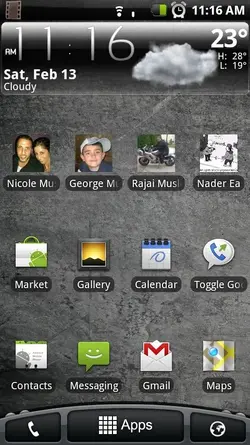
 
the picture you posted is specifically HTC's "SenseUI" custom user interface, which is indeed far more eye-pleasing than the basic Android one, comes with some gorgeous big widgets, and 7 desktops! But, AFAIK it's not yet been ported to the Droid

The Android 2.1 launcher that joeymoose posted is a pretty good alternative, I am using it myself :)
 
if you're rooted there's a metamorph theme called xhero that makes it look similar, but the buttons arent actually functional. they are just one big app drawer launcher
 
At the bottom of the screen, the phone has three buttons: "^", "phone" and "+". I've seen this sort of configuration many times before on other android phones, how do I get this done on my Droid? Is there an app I need to download? Currently I only have a simple up arrow at the bottom of the screen which opens the full application list. Thanks!

Thats to Matt ( Xeudoxus) over at AllDroid here is the app you need to get a Launcher like that without rooting.

beta1.jpg


Here is the link for the launcher app..http://www.alldroid.org/download/file.php?id=1600&sid=7141c059f24781c7f2114fe32a79f00c it also has 5 home screens.

You can get Beautiful Widgets on the Market and get the Sense UI skin here .. http://www.droidforums.net/forum/dr...ficial-beautiful-widgets-skinning-thread.html

The combination of these 2 apps will give you that look you want, again no root required.
 
Wow, great, thanks for all the help! I'll be downloading that launcher like most of you suggested. Rooting sounds a little too complex for me right now :)
 
Wow, great, thanks for all the help! I'll be downloading that launcher like most of you suggested. Rooting sounds a little too complex for me right now :)

Rooting isn't for everyone but it has many advantages.... I'm not saying your missing the boat but its a fun ride.
 
So how do you actually get the thing to work. I installed it via Astro but nothing is there. You go back into Astro and hit Launch and it comes back "Activity Not Found."
 
Got it. You just hit the home button. So it's acting as a home replacement and not shockingly it force closed the first time I tried it.

yawn.....

/unintstalled
 
So how do you actually get the thing to work. I installed it via Astro but nothing is there. You go back into Astro and hit Launch and it comes back "Activity Not Found."

Do a search on launcher in Astro. Find the file, and install it.
 
Back
Top