What's new
DroidForums.net | Android Forum & News

This is a sample guest message. Register a free account today to become a member! Once signed in, you'll be able to participate on this site by adding your own topics and posts, as well as connect with other members through your own private inbox!

Android Messages comes to your Desktop

PereDroid

Diamond Member
1_9i1yHAa.max-1000x1000-796x390.png

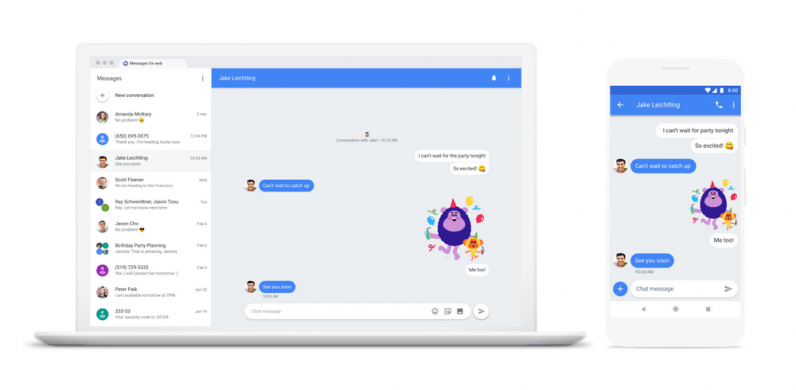
One of the most requested features that people have been asking Google for since they nerfed Hangouts has now been released. Google's newer SMS messages app, ingeniously called "Messages", is finally rolling out the ability to read, and respond to your texts through your browser.

It's ridiculously easy to set up. Maybe not Apple easy, but pretty easy. Just go here: https://messages.android.com and from the Messages app go to the 3 dot menu and choose "Messages For Web". Scan the QR code. I wouldn't know specifically how easy it is because, as usual, this is a staggered update. I use the (much prettier and more feature rich, IMO) Pulse app for my messaging, but I wanted to see how easy it was to set up for this news piece. So I switched to Android Messages and went to scan the QR code... and the option isn't available to me yet. Anyone tried it yet?

Source: TheNextWeb
Play Store: LINK to Android Messages
 
Thanks Pere Droid. We have been discussing this for a few days in a thread I started. The app update isn't out yet (at least not for folks that have responded) but Google says it's rolling out soon. [emoji106]


Android Messages Web View

Sent from my XT1650 using Tapatalk
 
Pulse has offered this feature for quite some time but you have to pay for it. I don't have it. By the month or year. There's a lifetime buy for I think $11.00.

Sent from my Moto Z (2) using Tapatalk
 
The Verizon Message+ app let's you sync texts with other devices also. I tried it for a while, it was OK. I like Android Messages better from an app standpoint. This isn't something I may use a lot, but an looking forward to just checking it out and see what it's like from my PC or Chromebook.

Sent from my XT1650 using Tapatalk
 
Pulse has offered this feature for quite some time but you have to pay for it. I don't have it. By the month or year. There's a lifetime buy for I think $11.00.

Sent from my Moto Z (2) using Tapatalk

lifetime buy for 11 bucks???? what is their monthly fee, two cents :-)
 
Well since you asked. [emoji2]
My issue is, Pulse doesn't work on your watch without this. It's one reason I often switch sms apps.
87b6affe1d1ceb1dbefc7fc829efd553.jpg


Sent from my Moto Z (2) using Tapatalk
 
  • Like
Reactions: CJM
I've been using Pulse SMS (Free) for a while now. It works well and I've thought about biting the bullet and going for the paid version to open up the Web/Table sync. But its a pretty big bite to chew. I'm hoping the new Messages update helps obviate the need.
 
Right? Everytime Google Rewards money gets close to $10 I start thinking about it...and then I buy something else. LOL

Sent from my Moto Z (2) using Tapatalk
 
Yea the initialcost, and based some of the comments on the app page, it seems its not uncommon for paid licenses to get "lost" when upgrading to a new phone.
 
Yea the initialcost, and based some of the comments on the app page, it seems its not uncommon for paid licenses to get "lost" when upgrading to a new phone.
I take things like that with a giant grain of salt though. Luke, the Dev, is very responsive to inquiries. I just emailed him jokingly last week, and he wrote me back in less then 10 hours.

Sent from my Moto Z (2) using Tapatalk
 
I take things like that with a giant grain of salt though. Luke, the Dev, is very responsive to inquiries. I just emailed him jokingly last week, and he wrote me back in less then 10 hours.

Sent from my Moto Z (2) using Tapatalk


Thank you much for that bit of insight! I'll wait and see how the Android messages thing goes, but I'll be more confident on pulling the trigger on Pulse if needed.
 
I downloaded the desktop version last night. It'll come in handy when I'm on my laptop at home. It's very similar to the phone version. The list of conversations goes down the left and the majority of the computer screen is open to type a "text". Worked well, what little I played with it. Husband who has the same phone (bought the same day) got it, as well.
 
Now available to all: Source 9to5Google

Revealed on Twitter last night by Google engineer Justin Uberti, the deployment of Android Messages for Web has been completed, meaning it’s available now for all users. Many were a bit disappointed last week when Google announced the debut of this tool after finding out that it wouldn’t be available to all right away. Personally, I had the switch flipped on my current daily driver, the OnePlus 6, just last night."
 
Back
Top